How to Authenticate With Spotify Using Auth0 🟢
Using Auth0 to Authenticate with Spotify and Show Account Details

❓ Why?
Lately I've been checking out Auth0. It's a platform that provides authentication and authorization solutions over a wide range of use cases.
A feature that caught my attention was the social log in. You can set up your application to accept credentials and acces your account data from social platforms like Facebook, Twitter, Google and more. The feature extends to any platform that complies with the OAuth specifications.
I thought it would be interesting to try this out with Spotify. I'll show you how I did it.
📺 Final Result
The final result is a web app which shows a login box and you can connect with your Spotify account. It will then show the name, email and picture from the account.

💚 Spotify Developer
Create a Developer Account
Before you can integrate Auth0 in the application you need to register your Spotify account as a Developer account.
You can do that at the Spotify Developer Dashboard.
After you log in (if not already) and accept the terms you will be redirected to the dashboard.

Create a Spotify App

The app is created.

Client ID and Secret
You will need the Client ID and the Client Secret from this app to connect with Auth0 app.

Hit "Show Client Secret".
Do not share the Client Secret with anyone (only with the Auth0 app).

🔐 The Auth0 Part
Register
First, you'll need to register to Auth0.
Select a Personal type of account.

Create Your Application
You will need to create an application in the Auth0 dashboard.
Go to Applications → Applications

Hit "Create Application".
Select a name for your application. For mine I chose Spotify Auth0.
And make it a Single Page Web Application.

After you create it you will see some instructions on how to integrate Auth0 in your application. We will look into that later.
🙋♂️ Create The Spotify Social Connection
Next you will create the social connection.
Go to Authentication → Social
 Hit "Create Connection".
Search for "Spotify".

Click on it.

Hit "Continue".
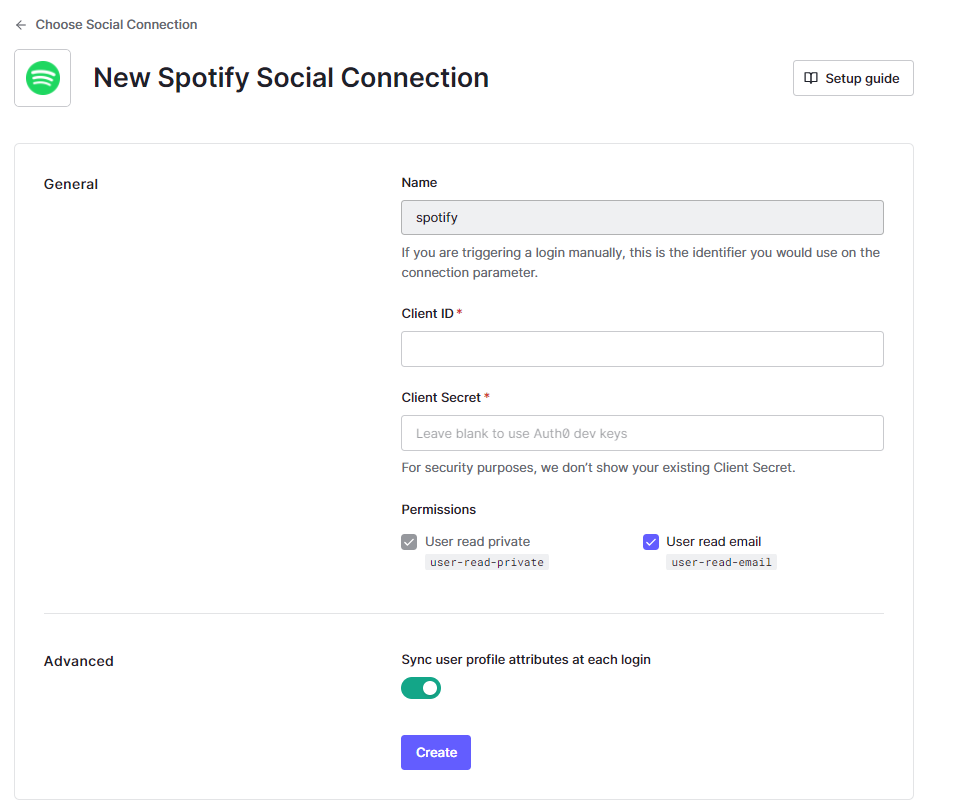
In Client ID you will add the Client Id from the Spotify App.
in Client Secret you will add the one from the Spotify App.

Hit "Create".
Then enable the connection for the app from Auth0.

🧶 Update Spotify App
You need to add some info from Auth0 to the Spotify app.
Hit "Edit Settings".

Add a Redirect URL
You need to add in the Spotify app a redirect URL. The URL can be deduced from the Auth0 application you created earlier.

It is https://<Domain>/login/callback.
In my case it is https://dev-t4oahv4f.us.auth0.com/login/callback.
Don't forget the https:// or http:// before the redirect URI.

Hit "Add" then "Save".
Add Allowed Accounts
The account you used to create the Spotify App will have permisions to authenticate to it. If you want additional accounts to have access you need to add them in the "Users and Access" pannel.

Try the Spotify Social Connection
In the Spotify connection dashboard in Auth0 you can test the connection.

An authorization page will open.

After you agree, a success page should appear.

If something went wrong then double check your settings.
The redirect URL from Spotify needs to exactly match the one from the Auth0 app.
🎨 The Web App
For this project I created a web app, but Auth0 allows integration with desktop, mobile and IoT apps as well.
The code for the app can be found here: https://github.com/alexzaharia24/spotify-auth0
Implementation
I used React.
Created the app using create-react-app.
Integrating Auth0
I could lay out the steps here, but already detailed instrunctions can be found in the Quick Start section of your Auth0 Application.

🤝 That's It

We're done!
🚚 Challenges & Caveats
- Had issues with redirect_uri. Solved by EXACTLY matching the redirect_uri from the request to the one in the spotify dev app (https://stackoverflow.com/questions/32956443/invalid-redirect-uri-on-spotify-auth)
- I have no idea where the image is taken from. The shown picture is different than the one from the Spotify Account. I did some digging on a different account and the picture displayed was from Gravatar. Really weird.
- You need to manually add the user to the spotify app in the dev dashboard. The default limit is 25 users. You can make a request for increasing the limit.
👋 Reach Out
What do you think about Auth0?
Let me know what you think in the comments or if you know where is the account picture taken from.
About the author
Software Engineer. Improviser.
From Romania
Comments
Join the discussionThinking about it, that Gravatar picture always comes up for me on random websites if I register through my Google account. I also find it very weird and annoying (mainly because I have no idea where that profile picture comes from 🤔). Is your Spotify account connected to your Google or Facebook account? That could partly explain it.
Anyway, great job and a great inspiration to create Spotify applications 😊
Thanks a lot, Elisa. Yeah, I also have my email connected to Gravatar and I was really surprised what picture I had set up, lol. I did it a long time ago. What is still not clear for me is why doesn't the Spotify account picture show up. I tried with a brand new account that doesn't have a connection to Gravatar and the shown picture is one generated from the name. Really weird.
Yayyy! Really cool :)
Thank you, James!